
- 1. Quick Facts Before You Buy
- 2. What Is Multipoint Connection, Really?
- 3. How Do Multipoint Bluetooth Headphones Work?
- 4. NANK Clip Super2: Our Pick for Dual-Device Life
- 5. Pairing Day: Getting Both Devices to Behave
- 6. Does Multipoint Cost You Sound Quality or Battery?
- 7. Conclusion
- 8. Frequently asked questions (FAQs)
Quick Facts Before You Buy
• Myth: One or two devices play at the same time. Fact: You get one audio stream, no matter what.
• Switching takes one to three seconds on good quality firmware, and more time with cheaper chips.
• AAC or SBC are baselines for multipoint, which typically kills LDAC and aptX Adaptive.
• The version number of Bluetooth is no indication whatsoever. The chipset decides.
• Working multipoint starts at about $45, not $300.
• The case does not function as a hub. It is a charger and does not maintain connections.
What Is Multipoint Connection, Really?

A multipoint connection means a headphone can hold two active Bluetooth connections to two separate sources at once. A call on your phone does not interrupt a video coming from your laptop. You never again need to unpair, sift through menu options, or go through the pairing dance twice a day. There is not much more to it.
On the same shelf, you will find it described three different ways: multipoint, multipoint Bluetooth, or multi point connection. It is all the same thing. Take away the marketing, and multipoint Bluetooth headphones boil down to two live links and one pair of ears.
The core issue is whether Bluetooth restricts two devices to listen simultaneously or whether it simply recalls them. It is the simultaneous part that serves as the true selling point, which is also marked on spec sheets as multipoint Bluetooth headset 2 devices.
How Do Multipoint Bluetooth Headphones Work?
Multipoint headphones maintain two concurrent Bluetooth connections to two source devices. They play audio from the source that is active or having a phone call. The other Bluetooth link remains alive as a sleeping companion, capable of being activated in a second or two. Below is what is going on, and in what order.
Two Links, One Radio
The headphone radio is not duplicated. It time travels, switching between two connection slots so quickly that both hosts think they are at the other end of that line. One link has an address, one has an interval, and each has keys for its own encryption method.
• Link Budget: Two open links double the housekeeping traffic of the radio, even while the radio is silent.
• Range Penalty: Expect about a 10% to 20% reduction in usable range when both links are active in a busy office environment using 2.4GHz.
Why Only One Stream Plays at a Time
Stereo music streams by one source using A2DP. Two streams will not be mixed. Multipoint firmware serves to park one stream and play the other. While the phone is still playing, your laptop thinks you are connected and keeps sending audio. Your headphones quietly forget and discard all the packets sent, only to remember again when you stop playing the phone. The headphone stopped listening. The computer was never told.
The Handoff: Who Wins, and When
Firmware is continually looking for three triggers: a new call, playback beginning on the idle device, or playback stopping on the active one. When it comes to inbound calls, the phone always wins. Typically, the music from the second device will only start playing when the first device is silent, thus giving the impression of a malfunction.
The Profiles Doing the Work
Multipoint connection Bluetooth headphones act like a number of simultaneous connections, and each connection will respond differently when stressed.
• A2DP (Audio): Stereo streaming allows only one active source, and there is no exception.
• HFP (Calls): Mono audio at eight kHz to 32kHz can take priority over A2DP from either device.
• AVRCP (Controls): These controls handle playing, stopping, and skipping tracks. Buttons correspond to the device in use.
The Chipset Sets the Ceiling
Bluetooth 5.3 is just a label. There has never been any requirement for multipoint in the Bluetooth SIG Core Specification. It is just a manufacturer implementation in the chipset. Excellent examples of two processor families developed for this purpose include the Qualcomm QCC and Airoha AB series.
Paired List vs. Active List
These two lists are constantly mixed up. The paired list can hold up to 8 credentials of different devices. There are only two slots on the live list. By adding a third, the headphones automatically kick out the least recently used one. Your tablet does not even give you a heads up.
Calls Beat Everything Else
Any multipoint Bluetooth headphones with mic setup is forced to process call audio. HFP has been executed with higher precedence in the firmware arbitration table than A2DP. That is why a good unit can also serve as a multipoint Bluetooth speakerphone at the desk and maintain association with the device that last rang.
The Failure Modes We See Most
Nine out of every ten returns refer back to one of these issues.
• Ghost Link: The phone shows it is connected but there is no audio. Turn Bluetooth off and on in the phone, not the headphone.
• Fight For Focus: Two devices have some audio playing in the background. Close browser tabs first.
• Case Interference: With multipoint connection earbuds, closing the cover causes one of the links to collapse immediately.
Pro Tip: If the headphone is not working, mute all the background tabs. A silent autoplay video keeps the A2DP stream open and will prevent the handoff completely.
NANK Clip Super2: Our Pick for Dual-Device Life

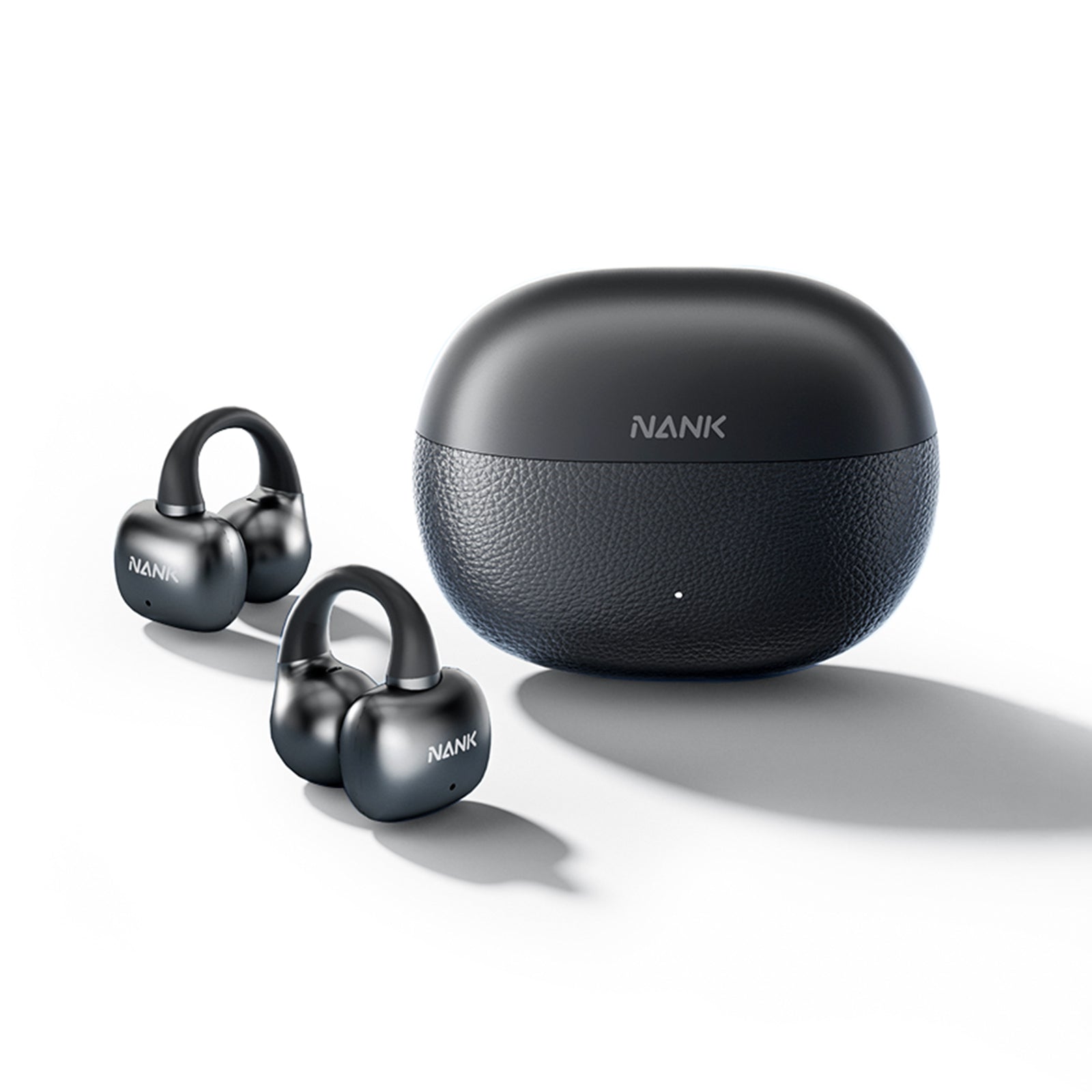
If you are in the market for Bluetooth headphones for multiple devices, this is what you are paying for when you purchase them. Bluetooth 6.0 and Dual Device Connection: Clip Super2 wireless earbuds offer faster pairing, lower latency, and a stable dual device connection. Suitable for fitness, gaming and daily commute.
The rest of the sheet holds up where multipoint usually falls apart. IPX5 Waterproof and Durable Battery Life: Clip Super2 workout earbuds deliver a remarkable 8-hour battery life off a single charge, extending to 30 hours when using the charging case. Lightweight Comfort and Secure Fit: Weighing just 4.8g per earbud, the flexible C-flex memory bridge adapts to different ear shapes, providing a secure, non-slip fit designed for all-day comfort.
Calls are where a second link earns its keep. Clear Call and Directional Audio with Minimal Leakage: Equipped with 32K HD call technology ensure crystal-clear conversations by reducing background noise and wind interference. The DS3.0 directional audio technology helps minimize sound leakage, making these clip on earbuds ideal for private listening in daily use.
Powered by NANK's Game Mode Low-Latency Technology, the Clip Super2 optimizes audio channels to ensure perfect audio-visual synchronization, offering faster and more accurate sound positioning.
Open-Ear Form, Comfort With Every Wear: With open-ear design and deep bass, immersive sound, your listening experience will reach a whole new level. Because it sits outside the ear canal, you can hear the ring tone from the second device and the cyclist behind you. Sale price $49.99, regular price $69.99, in White and Black, with free worldwide shipping.
Pairing Day: Getting Both Devices to Behave
You only need to do this one time, and you will never have to think about it again. There is an order of multipoint Bluetooth headphones pairing, and skipping one of the steps is why a lot of people think that their set is broken.
Step 1: Pair device one normally. Play 30 seconds of music to check if A2DP is bound.
Step 2: On device one, disable Bluetooth.
Step 3: Repeat the put into pairing process for the headphone and pair the second device.
Step 4: Enable the Bluetooth feature in device one again. You should now see both connected.
How To Connect Samsung Bluetooth Headset Devices?
Navigate to Settings, then Connections, then Bluetooth, and deactivate Dual Audio. That feature competes for multipoint usage of the identical radio slot.
How To Connect Wireless Headphones To iPhone?
Connect wireless headphones to your iPhone via Settings, then Bluetooth, and tap the device. iOS aggressively takes back the stream after calls, but it is best to pause the stream on the other device first. Android users have found another way to cut their ears off. The Absolute Volume feature can get out of sync between the two hosts, so one device ends up being too loud. Go to Developer options, un-tick it, and you are complete.
Does Multipoint Cost You Sound Quality or Battery?
Yes, definitely, on both aspects. The degree of the penalty hinges entirely on what codecs your firmware reverts to upon the opening of the second link. On most models, the penalty on sound is far more perceptible than on battery charge. If you set the headphones to multipoint, it disables LDAC and aptX Adaptive. It reduces you to AAC or SBC, which covers the large majority of headphones. The housekeeping cost using the second link will result in a battery cost of 8% to 15% for a complete charging cycle.
Here the significance of firmwares cannot be highlighted enough. About one-third of all multipoint issues that we have reported are resolved with a patch on an update the owner has not installed.
Conclusion
Firmware updates resolve most audio issues quickly. Before purchasing, ask yourself how many hours per day both devices require audio at the same time, and whether it is the microphone or the music that you would miss more.
For the majority of people, the ideal multipoint Bluetooth earbuds fall somewhere between $45 and $110, which is exactly where the NANK Clip Super2 sits with Bluetooth 6.0, a stable dual device connection, IPX5 and 30 hours with the case. Visit NANK to explore high quality open-ear models for your active lifestyle.
Does multipoint support triple power?
Rarely. Most of the times, two is the limit, but on the pairing list you can find eight sets of credentials that can be reconnected in just a few moments.
Does multipoint run the battery down significantly?
Yes, between 8% and 15% per cycle approximately. Even while being quiet, there must be ongoing housekeeping traffic on the second link.
What is the primary benefit of multipoint Bluetooth headphones?
Multipoint Bluetooth headphones allow you to maintain two active Bluetooth connections to separate devices simultaneously. This means you can listen to audio from your laptop and receive a call on your phone without needing to manually switch or re-pair your devices.
How do multipoint headphones handle multiple audio streams?
Despite connecting to two devices, multipoint headphones only play one audio stream at a time. The firmware prioritizes audio, typically switching to a phone call automatically or playing audio from the device that is currently active.
Can the NANK Clip Super2 hold two devices during a workout?
Yes. Clip Super2 wireless earbuds offer faster pairing, lower latency, and a stable dual device connection, suitable for fitness, gaming and daily commute, with IPX5 waterproofing and a secure, non-slip fit.
Does using multipoint connection affect battery life and sound quality?
Yes, multipoint connection can lead to a reduction in sound quality due to the codec limitations and a slight decrease in battery life, typically around 8% to 15%, because of the increased radio housekeeping.
What is the correct way to pair multipoint Bluetooth headphones with two devices?
First, pair the headphones with your primary device and play audio to confirm the connection. Then, disable Bluetooth on the first device, put the headphones back into pairing mode, and connect the second device. Finally, re-enable Bluetooth on the first device; both should now be connected.